
Your website may have looked modern when it was launched three or four years ago.
But websites age quickly.
Customer expectations change, mobile usage increases, browsers change, competitors improve their websites and your own business may start offering new services.
The result?
A website that technically still “works” may no longer be helping your business.
For many companies, the real question is not:
“Is my website online?”
It is:
“Is my website still doing its job?”
A good business website should help potential customers understand your services, trust your company and take the next step.
That next step could be:
- Call
- Request a Quote
- Book an Appointment
- Send an Enquiry
- Purchase a Product
If your website is getting old, difficult to use or generating very few enquiries, it may be time for a redesign.
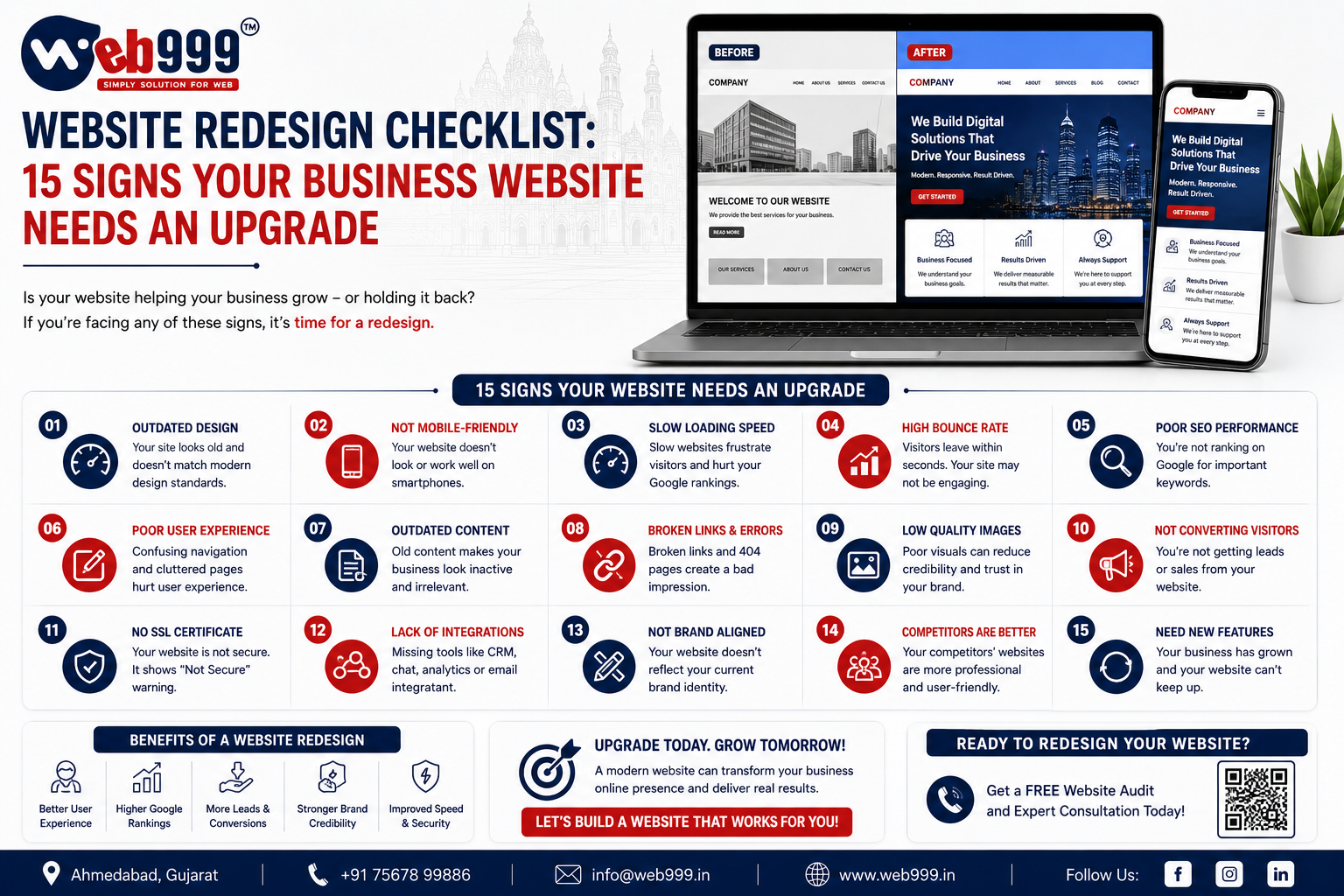
Here are 15 signs your business website needs an upgrade and a practical website redesign checklist to help you decide what should change.
1. Your Website Looks Outdated
The most obvious sign is visual appearance.
Website design trends change over time.
An outdated website may have:
- Old-fashioned layouts
- Too many colours
- Tiny text
- Poor spacing
- Low-quality graphics
- Old stock images
- Heavy shadows
- Too many animations
- Cluttered sections
- Inconsistent fonts
Customers may judge your business based on your website before they ever speak with you.
Imagine two companies provide the same service.
Company A has an old website that looks like it has not been updated for years.
Company B has a clean, professional and easy-to-use website.
Which company creates a stronger first impression?
Design does not automatically prove that a business is better.
But it can influence trust.
2. Your Website Does Not Work Properly on Mobile
Open your website on your smartphone.
Can you comfortably:
- Read the text?
- Open the menu?
- Click buttons?
- Fill out forms?
- View images?
- Call the business?
- Use WhatsApp?
If not, your website needs attention.
A modern business website should be responsive.
That means the layout should adapt properly to:
- Desktop
- Laptop
- Tablet
- Smartphone
A desktop-only website can create a frustrating experience for mobile visitors.
For local businesses especially, this can mean losing potential enquiries.
3. Your Website Loads Too Slowly
Website speed matters.
Visitors do not want to wait for:
- Large banners
- Heavy videos
- Oversized images
- Multiple sliders
- Unnecessary scripts
Common Reasons for Slow Websites
- Unoptimized images
- Poor hosting
- Too many WordPress plugins
- Heavy themes
- Old code
- External scripts
- Excessive animations
A website redesign is a good opportunity to remove unnecessary elements and improve performance.
Do not make the mistake of creating a visually impressive redesign that becomes even slower than the old website.
A modern website should balance design with performance.
4. Your Website Generates Very Few Enquiries
This is one of the most important warning signs.
You may receive visitors from:
- Google Ads
- Social media
- Google Maps
- Referrals
but very few people contact you.
If that happens, ask:
- Is the phone number visible?
- Is there a WhatsApp button?
- Are enquiry forms easy to use?
- Are CTAs clear?
- Does the website explain the service properly?
- Does the website build trust?
Traffic without enquiries can indicate a conversion problem.
A redesign should not focus only on appearance.
It should improve the path from:
Visitor → Interest → Trust → Enquiry
5. Your Website Has No Clear Call to Action
What should a visitor do after reading your homepage?
If the answer is unclear, your website may be losing leads.
Useful Calls to Action
- Get a Quote
- Call Now
- WhatsApp Us
- Book Appointment
- Request Pricing
- Schedule Consultation
- Send Your Requirement
Avoid making every button say:
Learn More
A visitor should know what will happen when they click.
During a website redesign, define the primary action you want visitors to take.
Then make that action easy to find throughout the website.
6. Your Business Has Changed but Your Website Hasn’t
Businesses evolve.
Maybe you launched your website five years ago with three services.
Today you provide ten.
Perhaps you have:
- Entered new markets
- Added products
- Changed your branding
- Opened another location
- Added a new team
- Started exporting
- Changed your target customers
- Changed your pricing model
If your website still represents the old version of your business, it is no longer doing its job properly.
A redesign gives you an opportunity to align your website with your current business.
Your website should represent who you are today, not who you were when the domain was first purchased.
7. Your Website Navigation Is Confusing
Visitors should not have to think too much about where to click.
Poor navigation might contain:
- Too many menu items
- Unclear labels
- Duplicate pages
- Important services hidden inside dropdowns
- Broken links
- No logical hierarchy
A business website might have a simple structure such as:
- Home
- About
- Services
- Portfolio
- Blog
- Contact
Then individual services can have dedicated pages.
For example:
- Website Development
- E-Commerce Development
- SEO
- Google Ads
Keep navigation logical.
A visitor should be able to reach important information in a few clicks.
8. Your Website Content Is Old
Look at your website carefully.
Does it contain:
- Old prices?
- Old phone numbers?
- Services you no longer provide?
- Old team members?
- Outdated addresses?
- Old offers?
- Old project information?
Outdated information can damage trust.
Imagine a customer calls because your website shows a package for ₹10,000.
Your team says:
“That price changed two years ago.”
The customer may immediately feel misled.
A website redesign should include a complete content review.
Do not simply copy every old paragraph into a new design.
9. Your Website Is Difficult to Update
Can your team easily change:
- Text
- Images
- Blogs
- Services
- Prices
- Portfolio
- Contact details
If every small change requires calling a developer, your website may be difficult to maintain.
A modern CMS such as WordPress can make routine updates easier for many businesses.
Depending on your website, you may need an admin panel for:
- Blogs
- Products
- Projects
- Properties
- Testimonials
- Services
A redesign is a good time to improve backend usability as well as frontend design.
10. Your Website Is Not SEO Friendly
A beautiful website that nobody finds on Google has limited marketing value.
Your website may need an SEO-focused redesign if it has:
- Poor URL structure
- Missing page titles
- Weak headings
- Duplicate content
- Thin service pages
- No internal linking
- Technical indexing problems
- Slow loading
- Poor mobile experience
For example, a URL such as:
website.com/page?id=123
is less descriptive than:
website.com/website-development-ahmedabad/
SEO should be considered during redesign, not added as an afterthought.
11. Your Important Services Don’t Have Separate Pages
A common mistake is putting every service on one page.
Suppose a company provides:
- Website Development
- SEO
- Google Ads
- E-Commerce Development
If all four services have only a small paragraph on one page, it becomes difficult to explain each service properly.
Separate service pages allow you to provide:
- Detailed information
- Features
- FAQs
- Portfolio examples
- Relevant CTAs
- SEO targeting
For example:
Website Development in Ahmedabad
can have its own dedicated page.
So can:
SEO Services in Ahmedabad
This improves both usability and content organization.
12. Your Website Has Broken Pages or Features
Click around your website.
You may discover:
- Broken buttons
- Forms that do not submit
- 404 pages
- Missing images
- Broken WhatsApp links
- Old social media links
- Maps that do not load
- Slider errors
These small problems can make a business look poorly maintained.
More importantly, a broken form can directly cost you leads.
Imagine someone fills out your enquiry form.
They click:
Submit
Nothing happens.
That potential customer may never try again.
Test important website functions regularly.
13. Your Website Does Not Build Trust
Ask yourself:
If I knew nothing about this company, would this website make me comfortable contacting them?
Trust signals can include:
- Real business information
- Office address
- Genuine portfolio
- Client testimonials
- Team information
- Certifications
- Case studies
- Google reviews
- Contact details
Avoid fake counters such as:
10,000+ Happy Clients
if the number cannot be supported.
Real information creates stronger credibility than exaggerated claims.
14. Your Competitors Have Much Better Websites
Your website does not exist in isolation.
Potential customers may compare you with several businesses before making contact.
Search for your main services on Google.
Look at competitors.
Compare:
- Design
- Mobile experience
- Speed
- Service pages
- Portfolio
- Content
- Pricing
- Calls to action
- Trust signals
Do not copy their website.
Instead, identify where your website is falling behind.
Your competitors may explain their services more clearly.
Some of them might have stronger portfolios.
Their contact process could also be easier for customers.
A redesign should help close those gaps while maintaining your own brand identity.
15. Your Website No Longer Represents Your Brand
Your branding may have changed since the website was created.
Perhaps you now have:
- New logo
- New colours
- New tagline
- New photography
- New positioning
- Different target audience
Your website should reflect your current brand consistently.
This includes:
- Logo
- Typography
- Colours
- Images
- Tone of voice
- Messaging
If your social media looks modern but your website looks completely different, the customer experience becomes inconsistent.
A redesign can bring everything together.
Website Redesign Checklist
Before starting a redesign, review your existing website carefully.
Check:
- Mobile responsiveness
- Website speed
- Navigation
- Homepage
- Service pages
- Content
- Images
- Forms
- Phone links
- SEO
- URLs
- Internal links
- Portfolio
- Testimonials
- Contact details
- Security
- Analytics
- Conversion tracking
Do not redesign only because you are bored with the current colours.
Identify actual business and user-experience problems first.
Start With Your Website Goals
Before discussing design, answer one question:
What should this website achieve?
Possible goals include:
- Generate Leads
- Generate Phone Calls
- Get WhatsApp Enquiries
- Sell Products
- Book Appointments
- Generate B2B RFQs
- Build Brand Credibility
Your website can have multiple goals, but there should be clear priorities.
These priorities should influence the redesign.
Review Your Current Website Data
If analytics and Search Console are already installed, review the existing data before redesigning.
Look at:
- Most visited pages
- Organic traffic
- Search queries
- Conversion pages
- Mobile traffic
- Landing pages
You may discover that an old page generates valuable Google traffic.
Do not remove or change important pages blindly.
Data can help you decide what should stay, what should improve and what should be removed.
Protect Existing SEO During a Redesign
This is extremely important.
A website redesign can improve SEO.
But a poorly managed redesign can also damage existing rankings.
Suppose your old page is:
/seo-services-ahmedabad/
and it already receives organic traffic.
During redesign, someone changes it to:
/seo-company/
and deletes the old URL.
If proper redirects are not implemented, you may lose valuable traffic and link signals.
Before Launching a Redesigned Website
- Record important URLs
- Preserve useful URLs where possible
- Plan redirects
- Check internal links
- Review page titles
- Review indexability
- Update sitemap
- Test important pages
SEO migration should be part of the redesign plan.
Don’t Delete Good Content Just Because It Looks Old
Sometimes a redesign project replaces useful content with shorter marketing copy.
For example, an old service page may contain 1,500 words of genuinely useful information.
The new designer replaces it with:
“We deliver innovative digital solutions.”
The new page may look cleaner but become less informative.
Improve presentation without automatically removing valuable content.
Design and SEO should work together.
Keep Your Important URLs Where Possible
Changing every URL during a redesign is usually unnecessary.
If a page already performs well and its URL is logical, consider keeping it.
For example:
/website-development-ahmedabad/
does not need to become:
/services/web-development-new/
simply because the design changed.
URL changes should have a reason.
Set Up Redirects for Removed Pages
Sometimes pages genuinely need to be removed or merged.
In that case, use appropriate redirects to send users and search engines to the most relevant new page.
Do not redirect every deleted page to the homepage.
The destination should make sense.
Improve Your Homepage
Your redesigned homepage should quickly explain:
- Who you are
- What you offer
- Who you serve
- Why someone should trust you
- What they should do next
Avoid filling the first screen with generic text.
For example:
Welcome to Our Company
does not communicate much.
A stronger headline might be:
Website Development & SEO Company in Ahmedabad
Then add a relevant CTA.
Improve Your Service Pages
Each major service page should answer important customer questions.
For example:
- What is the service?
- Who needs it?
- What is included?
- How does the process work?
- How much does it cost?
- How can I get started?
Then add:
- Get a Quote
- Call
A good service page should help both search engines and potential customers understand your offer.
Improve Your Contact Experience
Do not make customers work hard to contact you.
Your redesign should consider:
- Clickable phone number
- Contact form
- Address
- Google Maps
- Business hours
On mobile, important contact actions should be easy to tap.
Add WhatsApp Properly
A floating WhatsApp button can be useful.
But you can go further.
Use service-specific messages.
For example, on your website development page:
Hello, I need a quotation for website development.
On your SEO page:
Hello, I am interested in SEO services.
This can help your sales team understand where the lead came from.
Improve Your Forms
Old websites often have forms that ask too many questions.
For a basic enquiry, you may only need:
- Name
- Phone
- Requirement
Keep forms easy to complete on mobile.
For complex B2B services, you can ask for additional details where genuinely necessary.
Add Portfolio or Case Studies
If customers need proof of your work, show it.
A website development company can show completed websites.
A manufacturer can show products and applications.
A real estate business can show projects.
A photographer can show actual photography.
A strong portfolio helps visitors understand what you can deliver.
Improve Your About Page
Your About page should not be filled only with generic statements.
Tell visitors:
- Who you are
- What you do
- Where you operate
- Who you serve
- Relevant experience
Use genuine information.
Potential customers often check the About page before making a high-value enquiry.
Add Genuine Testimonials
If you have real customer feedback, use it.
Testimonials can help reduce uncertainty.
Where appropriate, include:
- Customer name
- Company
- Service used
- Genuine feedback
Avoid fabricated reviews.
Trust is difficult to build and easy to lose.
Update Your Images
Old, blurry or irrelevant images can make a website feel outdated even when the layout is new.
During redesign:
- Replace low-quality images
- Compress large images
- Use consistent image dimensions
- Use real business photos where possible
- Avoid excessive stock photography
High-quality images should improve the experience without slowing down the website.
Review Your Typography
Typography has a major impact on how modern a website feels.
Check:
- Font size
- Line spacing
- Heading hierarchy
- Paragraph width
- Button text
Do not use five different fonts on the same page.
Keep the visual system consistent.
Use White Space Properly
A modern website does not need to fill every empty area.
White space helps separate:
- Headings
- Text
- Images
- Buttons
- Sections
This can make content easier to scan.
A clean website often feels more professional than one filled with unnecessary graphics.
Don’t Overuse Animation
Animation can improve a website when used carefully.
But excessive movement can become distracting.
Avoid:
- Everything flying in
- Constantly moving buttons
- Heavy background effects
- Multiple animated counters
Ask:
Does this animation improve the user’s experience?
If not, remove it.
Review Website Security
A redesign is also a good time to review security.
Check:
- HTTPS
- SSL certificate
- CMS updates
- Plugin updates
- Backups
- Admin security
For WordPress websites, avoid keeping unnecessary outdated plugins.
Security should be part of ongoing website maintenance.
Install Analytics and Search Console
After redesigning, you should be able to measure performance.
Set up or verify:
- Google Analytics
- Google Search Console
Depending on your marketing, you may also need conversion tracking for:
- Google Ads
- Forms
- Phone clicks
- WhatsApp clicks
Without measurement, it becomes difficult to know whether the redesign actually improved business results.
Track Enquiries After the Redesign
A redesign should have measurable goals.
For example:
Before Redesign
10 enquiries per month
After Redesign
18 enquiries per month
This gives you something meaningful to evaluate.
You can also track:
- WhatsApp clicks
- Phone clicks
- Form submissions
- Quote requests
- Purchases
Do not judge success only by whether the new design looks better.
Test Everything Before Launch
Before launching the new website, test:
- Desktop
- Mobile
- Tablet
- Navigation
- Forms
- Phone links
- Email links
- Images
- Buttons
- Internal links
- Redirects
- Checkout if applicable
- Contact details
Ask someone who was not involved in the redesign to test it.
They may notice problems your development team missed.
Keep a Backup of the Old Website
Before replacing an existing website, create a complete backup.
This may include:
- Website files
- Database
- Images
- Content
If something goes wrong during migration, you have a recovery option.
Never make major website changes without an appropriate backup.
What Should You Keep From Your Old Website?
A redesign does not mean everything needs to disappear.
Keep what is already working.
That may include:
- High-ranking pages
- Useful content
- Good URLs
- Successful forms
- Strong portfolio pieces
- Existing backlinks
- Popular blogs
Improve the weak areas while protecting valuable assets.
Website Redesign vs Building a New Website
Sometimes improving the existing website is enough.
Other times, rebuilding makes more sense.
A Redesign May Be Suitable When
- CMS is still usable
- Website structure is reasonable
- Content is valuable
- Technical foundation is good
A Rebuild May Be Better When
- Technology is extremely outdated
- Website is difficult to maintain
- Code is poor
- Mobile experience is fundamentally broken
- Structure needs major changes
A proper review can help determine which approach is more practical.
How Often Should a Business Website Be Redesigned?
There is no fixed rule such as:
Redesign every 2 years.
A website should be upgraded when there is a genuine reason.
That reason could be:
- Poor performance
- Outdated branding
- New business model
- Mobile problems
- Technical limitations
- Weak conversions
- SEO problems
A well-built website can remain effective for years with regular improvements.
Do not redesign simply because a certain amount of time has passed.
How Much Does Website Redesign Cost?
Website redesign cost depends on the existing website and the amount of work required.
Factors can include:
- Number of pages
- Custom design
- CMS
- Content migration
- E-commerce
- SEO migration
- Forms
- Integrations
- Custom functionality
A small business website redesign will usually require a different budget from a large e-commerce or custom portal redesign.
Before getting a quotation, define exactly what needs to change.
Common Website Redesign Mistakes
Avoid:
- Focusing only on appearance
- Removing useful content
- Changing every URL
- Ignoring SEO
- Forgetting redirects
- Not testing mobile
- Adding too many animations
- Using huge images
- Forgetting conversion tracking
- Launching without backup
- Not testing forms
- Hiding contact information
- Copying competitors
A redesign should solve problems.
It should not simply replace one design with another.
Why Choose Web999 for Website Redesign in Ahmedabad?
At Web999, website redesign can focus on improving the complete user experience rather than simply changing colours and images.
Depending on your existing website, redesign work can include:
- Modern responsive design
- Mobile optimization
- Speed improvements
- Better navigation
- Service page restructuring
- WhatsApp integration
- Click-to-call
- Enquiry forms
- SEO-friendly structure
- Content improvements
- Portfolio sections
- Blog setup
- Conversion-focused CTAs
- WordPress development
- Existing content migration
The objective is to create a website that better represents your current business and makes it easier for potential customers to contact you.
Frequently Asked Questions
How Do I Know If My Website Needs a Redesign?
Common signs include outdated design, poor mobile experience, slow loading, low enquiries, confusing navigation, outdated content and technical problems.
Will Redesigning My Website Improve SEO?
A well-planned redesign can improve technical structure, mobile usability, content and speed.
However, careless redesigns can also damage existing rankings, especially when URLs and content are changed without proper planning.
Will I Lose My Google Rankings After Redesigning?
Not necessarily.
Important URLs, content and SEO elements should be reviewed carefully, and proper redirects should be implemented where URLs change.
Should I Redesign or Build a Completely New Website?
It depends on your existing technology, structure and business requirements.
Some websites need only design and usability improvements, while very old systems may benefit from rebuilding.
How Long Does Website Redesign Take?
The timeline depends on the number of pages, content, features and approvals required.
Can I Keep My Existing Domain?
Yes.
A website can usually be redesigned while keeping the same domain name.
Can My Existing Content Be Used?
Yes.
Useful existing content can be migrated and improved rather than deleted.
Should I Redesign My Website for Mobile?
Yes.
Modern websites should provide a strong experience across desktop, tablet and mobile devices.
Can WhatsApp Be Added During Redesign?
Yes.
WhatsApp, click-to-call and enquiry forms can be integrated into the redesigned website.
Can Web999 Redesign an Existing WordPress Website?
Yes.
Existing WordPress websites can be reviewed and redesigned depending on their current setup and requirements.
Final Thoughts
A website redesign should not begin with:
“Which colour should we use?”
It should begin with:
“What is not working on the current website?”
Your website might be loading too slowly.
In some cases, it may not work properly on mobile devices.
Customers may struggle to find your phone number.
Your services could also have changed over time.
In addition, your Google rankings may have dropped.
Or maybe the website simply no longer represents the quality of your business.
Use this checklist to identify the real problems first.
Then redesign around:
- Better User Experience
- Faster Performance
- Mobile-Friendly Design
- Clear Services
- Strong SEO Structure
- Easy WhatsApp & Phone Contact
- Better Lead Generation
Your new website should not simply look newer.
It should work better for your business.
If your current website feels outdated or is not generating enough enquiries, Web999 can review the existing website and help plan a modern, responsive and SEO-friendly redesign.
Thinking About Redesigning Your Business Website?
Contact Web999 to discuss your existing website, problems and redesign requirements.
SEO Details
SEO Title: Website Redesign Checklist: 15 Signs Your Website Needs an Upgrade
Primary Keyword: website redesign checklist
URL Slug: /website-redesign-checklist/
Meta Description: Is your business website outdated? Discover 15 signs your website needs a redesign and what to check before upgrading your design, SEO and mobile experience.
Secondary Keywords: website redesign Ahmedabad, website redesign company Ahmedabad, signs website needs redesign, business website upgrade, website redesign SEO, redesign old website, WordPress website redesign Ahmedabad
