
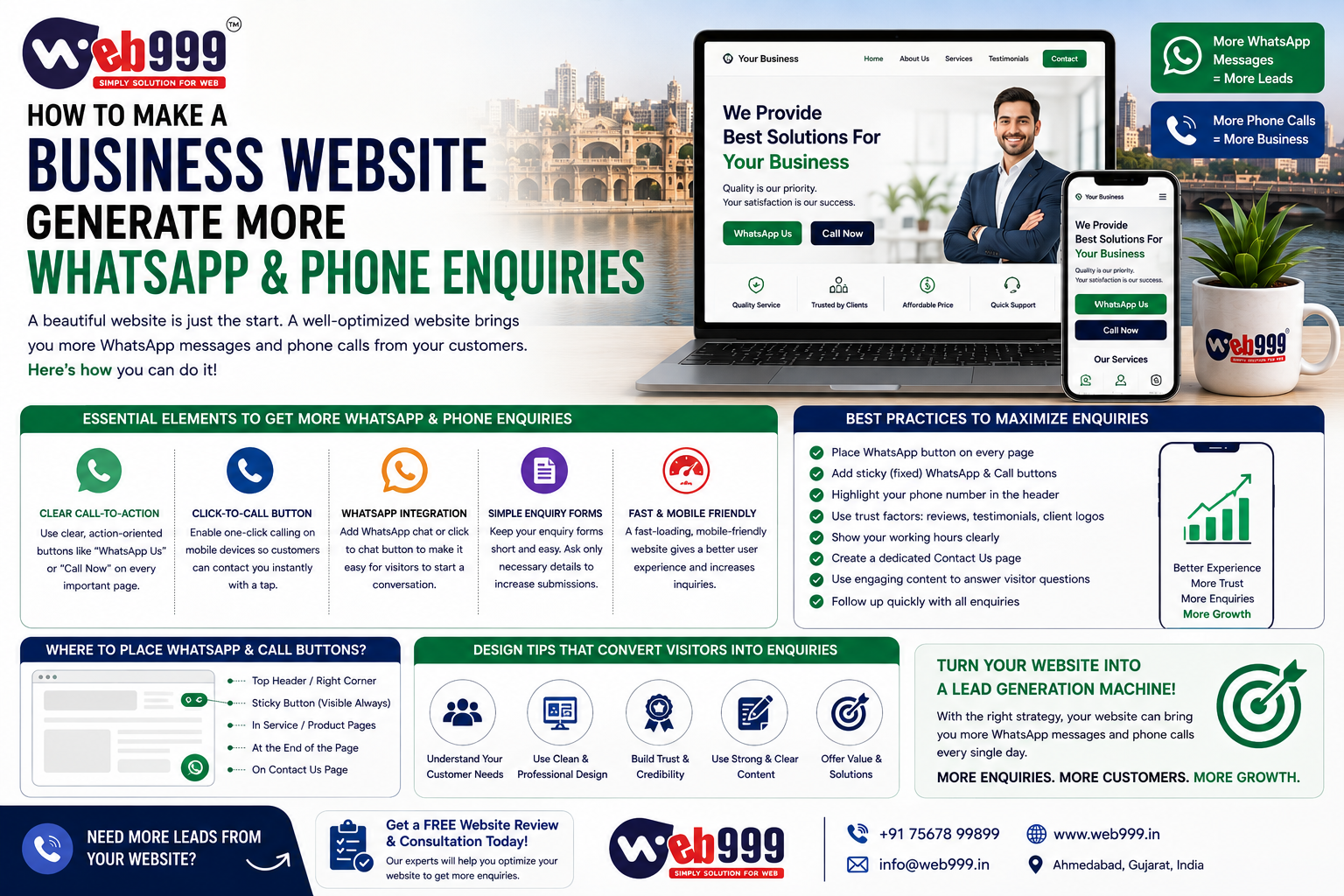
A business website should not only look good.
It should help people contact you.
For many local businesses, the most valuable website actions are simple:
- WhatsApp Message
- Phone Call
- Request a Quote
- Book Appointment
- Send Enquiry
If your website gets traffic but very few calls or WhatsApp messages, the problem may not be your marketing.
The problem may be the website itself.
A visitor may be interested in your service but still leave because:
- Your phone number is hard to find
- WhatsApp is not visible
- The website is too slow
- The form is too long
- Your offer is unclear
- The visitor does not trust your business
- The page has too many distractions
This guide explains how to make a business website generate more WhatsApp and phone enquiries without making the website look aggressive or spammy.
1. Put Your Phone Number Where People Can See It
One of the simplest improvements is also one of the most overlooked.
Do not hide your phone number only on the Contact page.
A visitor should be able to find it quickly.
Good places include:
- Website header
- Mobile sticky bar
- Service pages
- Contact section
- Footer
On mobile devices, make the phone number clickable.
Instead of displaying:
98765 43210
use a clear button such as:
Call Now
This removes one extra step.
The easier it is to call, the more likely a high-intent visitor is to contact you.
2. Add a Visible WhatsApp Button
For many Indian businesses, WhatsApp is one of the easiest ways for potential customers to start a conversation.
A visitor may not be ready to make a phone call.
They may prefer to send:
- “Price?”
- “Please send details.”
- “Is this service available in Ahmedabad?”
- “I need a quotation.”
A visible WhatsApp button makes that easier.
Useful button text includes:
- WhatsApp Us
- Chat on WhatsApp
- Get Quote on WhatsApp
- Send Your Requirement
Avoid vague icons with no explanation if your audience may not immediately understand them.
3. Use a Sticky Mobile Contact Bar
Mobile visitors are extremely important for local businesses.
A useful mobile website can keep key actions visible while the visitor scrolls.
For example:
Call | WhatsApp | Enquire
A sticky contact bar can work well because the customer does not need to return to the top of the page.
This is particularly useful for:
- Taxi companies
- Doctors
- Real estate businesses
- Repair services
- Website companies
- Local service providers
- Restaurants
- Salons
Keep the bar simple.
Too many buttons can make the page feel cluttered.
4. Use a Clear Call to Action Above the Fold
The first section of your website should tell visitors what to do next.
For example:
Professional Website Development in Ahmedabad
Get a responsive, SEO-ready business website designed for more enquiries.
Then show:
- Get a Quote
- WhatsApp Us
- Call Now
This is much stronger than using a large banner that only says:
Welcome to Our Website
The first screen should explain:
- What you offer
- How to contact you
5. Make the Offer Easy to Understand
People are less likely to contact you if they do not understand what you are offering.
Avoid vague statements such as:
“We provide innovative solutions for your business.”
Instead, be specific.
For example:
Business Website Development in Ahmedabad
Responsive 5–6 page websites with WhatsApp, enquiry forms and basic SEO setup.
Now the visitor knows exactly what the service is.
Clarity creates better enquiries.
6. Add WhatsApp to Important Service Pages
Do not add WhatsApp only to the homepage.
Suppose someone lands directly on:
E-Commerce Website Development
after searching on Google.
That visitor may never visit your homepage.
The product or service page itself should provide an easy way to contact you.
Add relevant CTAs such as:
- Get E-Commerce Quote on WhatsApp
- Discuss Your Website Requirement
Context-specific CTAs often feel more natural than repeating the same generic button everywhere.
7. Use Pre-Filled WhatsApp Messages
A good WhatsApp button can open a conversation with a pre-written message.
For example:
Hello, I need a quotation for website development.
Or on a specific service page:
Hello, I am interested in e-commerce website development. Please share details.
This helps in two ways.
The customer does not have to think about what to write.
Your sales team immediately understands which service generated the enquiry.
Taxi Example
Hello, I need a taxi from Ahmedabad to Udaipur.
Doctor Example
Hello, I would like to request an appointment.
Manufacturer Example
Hello, I am interested in your industrial mixer. Please share details.
8. Add Click-to-Call on Every High-Intent Page
Some customers prefer speaking directly.
Make sure important pages have a:
Call Now
option.
High-intent pages may include:
- Service pages
- Pricing pages
- Product pages
- Contact page
- Landing pages
- Location pages
Do not force someone to fill out a form when they are ready to call.
Give different customers different contact options.
9. Keep Your Contact Form Short
Long forms can reduce enquiries.
A simple lead-generation form may only need:
- Name
- Phone
- Service Required
- Message
In some cases, even:
- Name
- Phone
- Requirement
may be enough.
Ask only for information you actually need at the first stage.
You can collect more details after your team contacts the customer.
10. Show Pricing or Starting Prices When Possible
One reason visitors do not enquire is uncertainty.
They may think:
“This company is probably too expensive.”
If your pricing is standardized, showing starting prices can help.
For example:
- Business Website Starting From ₹11,999
- E-Commerce Website Starting From ₹29,999
This helps qualify customers.
People with a completely different budget may leave, while more relevant prospects are more likely to contact you.
If your pricing depends heavily on the project, use:
Request a Custom Quote
instead of hiding the pricing process completely.
11. Add a Strong CTA After Pricing
After a visitor sees the price, make the next step obvious.
For example:
Need a Custom Requirement?
WhatsApp Us for a Quote
or:
Not Sure Which Package You Need? Call Our Team
Do not let the pricing section end without a clear action.
12. Add Calls to Action Throughout Long Pages
A long service page may contain:
- Introduction
- Features
- Process
- Portfolio
- Pricing
- FAQs
If the only contact button appears at the bottom, many visitors will never reach it.
Add CTAs naturally after important sections.
After Features
Discuss Your Requirement
After Portfolio
Want a Similar Website? WhatsApp Us
After Pricing
Get a Custom Quote
After FAQs
Still Have Questions? Call Us
This creates multiple opportunities to convert without using aggressive pop-ups.
13. Don’t Overuse Pop-Ups
A visitor opens your website.
Immediately:
Enter your phone number
They close it.
Five seconds later:
Chat with us
They close it.
Then another popup:
Get 20% discount
This can become frustrating.
Use pop-ups carefully.
For many businesses, visible call and WhatsApp buttons are enough.
If you use an enquiry popup, consider showing it after the visitor has had time to understand your service.
14. Improve Your Website Speed
Every paid click or organic visitor has value.
A slow website can waste that traffic.
Common speed problems include:
- Large images
- Heavy video backgrounds
- Too many plugins
- Poor hosting
- Unnecessary scripts
- Multiple sliders
Compress images and remove unnecessary elements.
A visitor should not have to wait several seconds before seeing the phone number or WhatsApp button.
15. Make Mobile Experience a Priority
Someone visiting from a phone should easily be able to:
- Read your service
- Tap WhatsApp
- Call
- View price
- Submit form
- Find your address
Check the website on an actual mobile device.
Do not rely only on desktop previews.
Pay attention to:
- Button size
- Text size
- Form fields
- Sticky elements
- Spacing
- Speed
A website that works beautifully on desktop but poorly on mobile can lose a large number of enquiries.
16. Put Trust Near the Contact Button
People hesitate before contacting a business they do not know.
Add trust signals close to your CTA.
Examples include:
- Years of experience
- Real client reviews
- Portfolio
- Business address
- Completed projects
- Certifications
- Genuine team photos
- Company registration details where appropriate
For example:
500+ Projects Completed
Ahmedabad-Based Team
WhatsApp Us for a Quote
This gives the visitor a reason to feel more confident before contacting you.
Only use trust claims you can genuinely support.
17. Use Real Reviews
A genuine review can help visitors decide.
Instead of only showing:
★★★★★
add real feedback when available.
For example:
“The team completed our website on time and helped us with all changes after launch.”
Detailed feedback feels more credible than generic:
“Best service.”
If you have Google reviews, you can highlight genuine customer experiences.
Do not invent testimonials.
18. Show Your Real Work
For service businesses, portfolio proof can strongly influence enquiries.
If you offer:
- Website development
- Interior design
- Photography
- Real estate
- Manufacturing
- Graphic design
show actual work.
Then add a CTA nearby.
For example:
Like This Project?
WhatsApp Us to Discuss Your Website
A visitor who has just seen relevant proof may be more likely to contact you.
19. Create Industry-Specific Pages
A generic service page may not speak directly to every customer.
Suppose you provide website development.
Instead of only having:
Website Development Services
you can also create useful pages for:
- Website Development for Manufacturers
- Website Design for Doctors
- Real Estate Website Development
- Taxi Website Development
A doctor visiting a doctor-specific website page may feel:
“They understand my business.”
That can increase enquiry quality.
20. Create Location-Specific Pages Where Useful
If you serve a specific city, make your location clear.
For example:
Website Development Company in Ahmedabad
is more relevant to a local business than a generic:
Website Development Company
If you genuinely serve particular locations, you can create useful local pages.
Do not create hundreds of duplicate city pages.
Each location page should provide real value.
21. Use Strong Service Page Headlines
Your headline should answer the visitor’s main question immediately.
Weak
Grow Your Business With Us
Better
SEO Services in Ahmedabad for Local Businesses
Weak
We Build Digital Experiences
Better
Professional WordPress Website Development in Ahmedabad
A clear headline can improve both user understanding and enquiry quality.
22. Explain What Happens After They Contact You
Some visitors hesitate because they do not know what will happen next.
Explain the process.
For example:
Step 1
Share Your Requirement
Step 2
Our Team Reviews It
Step 3
We Send a Quotation
Step 4
Work Begins After Approval
This reduces uncertainty.
For a phone CTA:
Call us to discuss your requirement and get a suitable recommendation.
For WhatsApp:
Send your requirement on WhatsApp and our team will respond with the next steps.
23. Give People a Reason to Contact You Now
Your CTA can be more specific than:
Contact Us
For example:
- Get Website Cost Estimate
- Check Availability
- Request Free Consultation
- Get Custom Quote
- Ask for Product Price
- Schedule Site Visit
The CTA should match the visitor’s intent.
Do not use artificial urgency unless it is genuine.
24. Answer Common Questions Before the Enquiry
A visitor may not contact you because of unanswered questions.
FAQs can remove these barriers.
For example, a website development company can answer:
- How much does a website cost?
- How long does development take?
- Do you provide hosting?
- Will I get admin access?
- Is SEO included?
After the FAQ section, add:
Have a Different Question? WhatsApp Us
This creates a natural conversion opportunity.
25. Add a Callback Request
Not everyone wants to call immediately.
A simple callback form can ask:
- Name
- Phone Number
- Preferred Time
Button:
Request a Callback
This can work well for:
- Real estate
- Financial services
- Website services
- B2B businesses
- Clinics
It gives visitors a low-friction alternative.
26. Add a Quote Request
For services where pricing depends on requirements, use a clear:
Request a Quote
form.
Website Development Quote Form
- Website type
- Number of pages
- Existing website
- Required features
Manufacturing Quote Form
- Product
- Quantity
- Specification
- File upload
The form should match the business.
27. Let Customers Upload Requirements Where Useful
For certain businesses, file upload can improve lead quality.
Manufacturer
May receive:
- Technical drawings
- BOQ
- PDF specifications
Printing Company
May receive:
- Artwork
Website Company
May receive:
- Reference document
This makes it easier to understand the enquiry.
Do not request sensitive or unnecessary documents.
28. Make Your Contact Page Useful
A contact page should not contain only a form.
Add:
- Business name
- Phone
- Address
- Google Map
- Working hours
If you serve customers remotely, explain that clearly.
A complete contact page builds confidence.
29. Add Google Maps for Local Businesses
For a genuine local office, clinic, showroom or store, Google Maps can help visitors verify your location.
This can be particularly important for:
- Doctors
- Real estate companies
- Retail stores
- Agencies
- Restaurants
Add:
Get Directions
where appropriate.
30. Keep Business Information Consistent
Your phone number and business information should match across:
- Website
- Google Business Profile
- Social media
- Business directories
Outdated contact information creates lost enquiries.
Imagine spending money to bring someone to your website and showing a phone number that no longer works.
Check this regularly.
31. Add a Strong Footer
The footer is often the last section a visitor sees.
Use it well.
Include:
- Main services
- Phone number
- Address
- Important links
Finish with a clear action.
For example:
Need a Website Quote? WhatsApp Web999 Today.
32. Use Sticky WhatsApp Carefully
A floating WhatsApp button can work well.
But avoid making it:
- Too large
- Covering content
- Blocking form fields
- Constantly animated
It should be visible without becoming annoying.
Test it on different screen sizes.
33. Track WhatsApp Clicks
Adding a WhatsApp button is only the beginning.
Track how many people click it.
Without tracking, you may think your website is not generating leads even though customers are contacting you through WhatsApp.
Track actions such as:
- WhatsApp button clicks
- Phone clicks
- Form submissions
- Quote requests
This helps you understand which pages generate enquiries.
34. Track Phone Clicks
For mobile visitors, track clicks on your phone number or Call Now button.
This does not always tell you whether the call was completed, but it gives you useful information about intent.
Depending on your setup, more advanced call tracking may also be possible.
35. Identify Which Page Generates Leads
Do not only ask:
How many enquiries did my website get?
Ask:
Which pages generated them?
For example:
- Homepage: 5 leads
- SEO page: 15 leads
- Website development page: 30 leads
- Blog: 8 leads
Now you know which content is contributing to business.
You can improve those pages further.
36. Create Dedicated Landing Pages for Ads
If you run Google Ads or Meta Ads, do not automatically send every campaign to the homepage.
For example:
- SEO Ads → SEO Landing Page
- Website Ads → Website Development Landing Page
- E-Commerce Ads → E-Commerce Landing Page
Each page can have its own:
- Headline
- Offer
- WhatsApp message
- Phone CTA
- Lead form
This can improve relevance and lead quality.
37. Use Different WhatsApp Messages for Different Pages
This is an easy way to identify lead sources.
Website Page
Hello, I need a website development quotation.
SEO Page
Hello, I am interested in SEO services for my business.
E-Commerce Page
Hello, I need an e-commerce website.
Now when your team receives the WhatsApp message, they immediately know what the customer wants.
38. Don’t Ask Visitors to “Learn More” Everywhere
Learn More can be useful for informational navigation.
But on high-intent pages, use more specific CTAs.
Instead of:
Learn More
try:
- Get Pricing
- Request Quote
- Call for Details
- WhatsApp Our Team
The visitor should understand what happens after clicking the button.
39. Avoid Too Many Different CTAs
Too many choices can create confusion.
If one section says:
Contact Us
another says:
Get Started
another says:
Talk to Expert
another says:
Let’s Connect
another says:
Know More
the user experience becomes inconsistent.
Choose a small number of clear actions.
Primary CTA
Get a Quote
Secondary Options
- Call
Keep them consistent throughout the website.
40. Don’t Use Fake Urgency
Avoid countdown timers such as:
Offer Ends in 09:59
if the timer simply resets every time the page is opened.
This can reduce trust.
Use urgency only when there is a genuine:
- Offer deadline
- Limited booking capacity
- Event date
- Promotional period
Trust is more valuable than short-term tricks.
41. Make Your Website Look Trustworthy
Visitors judge a business quickly.
Common trust problems include:
- Broken images
- Spelling mistakes
- Outdated design
- Wrong phone numbers
- Fake reviews
- Poor mobile layout
- No address
- Copied content
A clean and professional website can make visitors more comfortable contacting you.
You do not need a complicated design.
You need a polished one.
42. Use Simple Language
Avoid writing website content only to impress competitors.
Your customer needs to understand it.
For example:
Instead of:
“We synergize innovative digital ecosystems to amplify organizational scalability.”
write:
“We build professional websites that help businesses generate more enquiries.”
Clear language converts better because people understand it immediately.
43. Speak About the Customer’s Problem
Do not make every sentence about your company.
Instead of:
We have 10 years of experience.
also explain:
Need a website that makes it easy for customers to call or WhatsApp you?
Your experience is important.
But the customer first wants to know whether you understand their problem.
44. Add Strong Copy Around WhatsApp
Do not only show a green button.
Add context.
For example:
Not Sure Which Website Package You Need?
Send your requirement on WhatsApp and our team will help you choose.
This gives the visitor a reason to start the conversation.
45. Add Strong Copy Around Phone Calls
The same applies to phone buttons.
Instead of only:
Call Now
try:
- Have a Custom Requirement? Call Our Team
- Need Pricing Today? Speak With Us
Use natural wording.
Do not make every CTA sound urgent.
46. Improve High-Traffic Pages First
You do not need to redesign your entire website immediately.
Start by checking pages receiving the most visitors.
For example:
- Homepage
- Top service page
- Popular blog
- Google Ads landing page
Ask:
- Is WhatsApp visible?
- Is Call visible?
- Is the offer clear?
- Is there a trust signal?
- Is there a CTA after the content?
Small improvements on high-traffic pages can make a meaningful difference.
47. Don’t Forget Blog Visitors
Blog traffic is often treated as informational only.
But a blog visitor can become a lead.
For example, someone reads:
How Much Does Website Development Cost in Ahmedabad?
At the end, add:
Need an exact quotation for your business website? WhatsApp Web999 with your requirements.
This CTA is directly related to what they were reading.
That is much stronger than a generic banner.
48. Use Internal Links to Move Visitors Toward Services
A blog can introduce someone to your business.
Internal links can then move them closer to a service page.
For example:
Blog
Static vs Dynamic Website
links to:
Service Page
Website Development Services
Then the service page provides:
- Get a Quote
- Call
This creates a complete conversion journey.
49. Review Enquiry Quality
More enquiries are not always better.
Suppose your changes double WhatsApp messages, but most people only ask for free information and never buy.
You may need to improve qualification.
You can do this through:
- Clear pricing
- Better service explanation
- Target audience information
- Better form fields
The goal is not only more enquiries.
It is more relevant enquiries.
50. Follow Up Quickly
Your website may generate the lead, but your sales process closes it.
If someone submits:
I need a website quotation
and receives no reply for two days, they may already have hired another company.
Try to create a clear process for:
- WhatsApp response
- Phone callback
- Form enquiry follow-up
Website optimization and sales follow-up should work together.
Example Conversion Flow for a Business Website
Suppose someone searches:
Website Development Company in Ahmedabad
They open your page.
They see:
Professional Website Development in Ahmedabad
Then:
- Starting Price
- Features
- Portfolio
- Reviews
- FAQs
Then:
WhatsApp for Quote
They click WhatsApp.
A message opens:
Hello, I need a quotation for a business website.
Your team responds.
This is a simple conversion flow:
Google → Website → Trust → WhatsApp → Sales Conversation
The fewer unnecessary barriers between these stages, the better.
Common Reasons Websites Get Traffic but No Enquiries
If your website receives visitors but almost nobody contacts you, check for:
- Hidden phone number
- No WhatsApp
- Weak headline
- No clear offer
- No pricing information
- Poor mobile design
- Slow loading
- Long forms
- Weak trust signals
- No portfolio
- Generic content
- No CTA
- Too many pop-ups
- Wrong audience
- Poor lead follow-up
Often, conversion problems come from several small issues rather than one major problem.
Should You Use WhatsApp or Phone?
Use both if both are useful for your business.
Different customers prefer different communication methods.
Useful for:
- Quick enquiries
- Sharing requirements
- Sending documents
- Asking for pricing
Phone
Useful for:
- Urgent enquiries
- Complex discussions
- High-intent customers
- Immediate confirmation
Do not force everyone into one channel.
Which Businesses Benefit Most From WhatsApp Enquiries?
WhatsApp can work particularly well for:
- Website companies
- Taxi businesses
- Real estate
- Travel agencies
- Manufacturers
- Retail businesses
- Local services
- Event businesses
The exact strategy depends on how your customers normally communicate.
Which Businesses Benefit Most From Phone Enquiries?
Calls can be particularly useful when customers need immediate help.
Examples include:
- Taxi businesses
- Clinics
- Repair services
- Property enquiries
- Local service providers
For B2B services, phone calls may also be valuable once the prospect has a serious requirement.
How Web999 Can Help Improve Website Enquiries
At Web999, a business website can be planned around lead generation rather than simply visual design.
Depending on the project, conversion-focused features can include:
- WhatsApp integration
- Click-to-call
- Lead forms
- Quote forms
- Mobile sticky contact buttons
- Service-specific landing pages
- Pricing sections
- Portfolio sections
- Testimonials
- Local SEO
- Conversion tracking
- Google Ads landing pages
- Mobile optimization
- Speed-focused development
The objective is simple:
Make it easier for interested visitors to become genuine enquiries.
A website should support your sales process.
It should not make customers work hard just to contact you.
Frequently Asked Questions
How Can I Get More WhatsApp Enquiries From My Website?
Make the WhatsApp button easy to find, use service-specific pre-filled messages and add the CTA naturally to important pages.
Where Should I Put the WhatsApp Button?
Useful locations include the header, mobile sticky bar, service pages, pricing sections and the end of blog posts.
Should My Website Have a Call Now Button?
If phone enquiries are valuable for your business, yes.
Make it clickable on mobile devices.
Is a Floating WhatsApp Button Enough?
It can help, but a strong conversion strategy also requires clear offers, good content, trust and relevant CTAs.
Should I Display Prices on My Website?
If your pricing is clear, displaying starting prices can help qualify leads.
Businesses with custom pricing can use a Request a Quote CTA.
Why Does My Website Get Traffic but No Enquiries?
Possible reasons include weak CTAs, poor mobile design, slow loading, unclear services, low trust or targeting the wrong visitors.
How Long Should a Contact Form Be?
Keep it as short as possible while collecting the information needed for the first sales conversation.
Can Blog Posts Generate WhatsApp Enquiries?
Yes.
Add relevant CTAs to blogs and link readers to related service pages.
Should I Track WhatsApp and Call Clicks?
Yes.
Tracking helps you understand whether your website is actually generating contact actions.
Can Web999 Redesign a Website to Generate More Leads?
Yes.
An existing website can be reviewed for mobile usability, CTA placement, page structure, speed, landing pages and lead-generation opportunities.
Final Thoughts
A business website should not make customers search for a way to contact you.
If a visitor is interested, the next step should be obvious.
Focus on:
- Clear Offers
- Visible Phone Numbers
- WhatsApp Buttons
- Strong CTAs
- Short Forms
- Real Reviews
- Portfolio Proof
- Fast Loading
- Mobile-Friendly Design
- Lead Tracking
Most importantly, make contacting your business feel easy.
You do not need ten pop-ups or aggressive sales tactics.
Sometimes the difference between losing a visitor and receiving an enquiry is simply a well-placed:
Call Now
or:
WhatsApp Us
button.
If your website gets traffic but does not generate enough calls or WhatsApp enquiries, Web999 can help improve the website structure, CTAs, mobile experience and conversion flow.
Want More Enquiries From Your Website?
Contact Web999 to review your existing website and identify opportunities to generate more WhatsApp messages, phone calls and genuine business leads.
SEO Details
SEO Title
How to Get More WhatsApp & Phone Enquiries From Your Website
Primary Keyword
how to get more enquiries from website
URL Slug
/get-more-whatsapp-phone-enquiries-website/
Meta Description
Learn how to make your business website generate more WhatsApp and phone enquiries with stronger CTAs, mobile design, trust signals and better conversion flow.
Secondary Keywords
- Website lead generation
- Increase website enquiries
- WhatsApp integration website
- Phone enquiries from website
- Website conversion optimization
- Lead generation website Ahmedabad
- WhatsApp leads
