
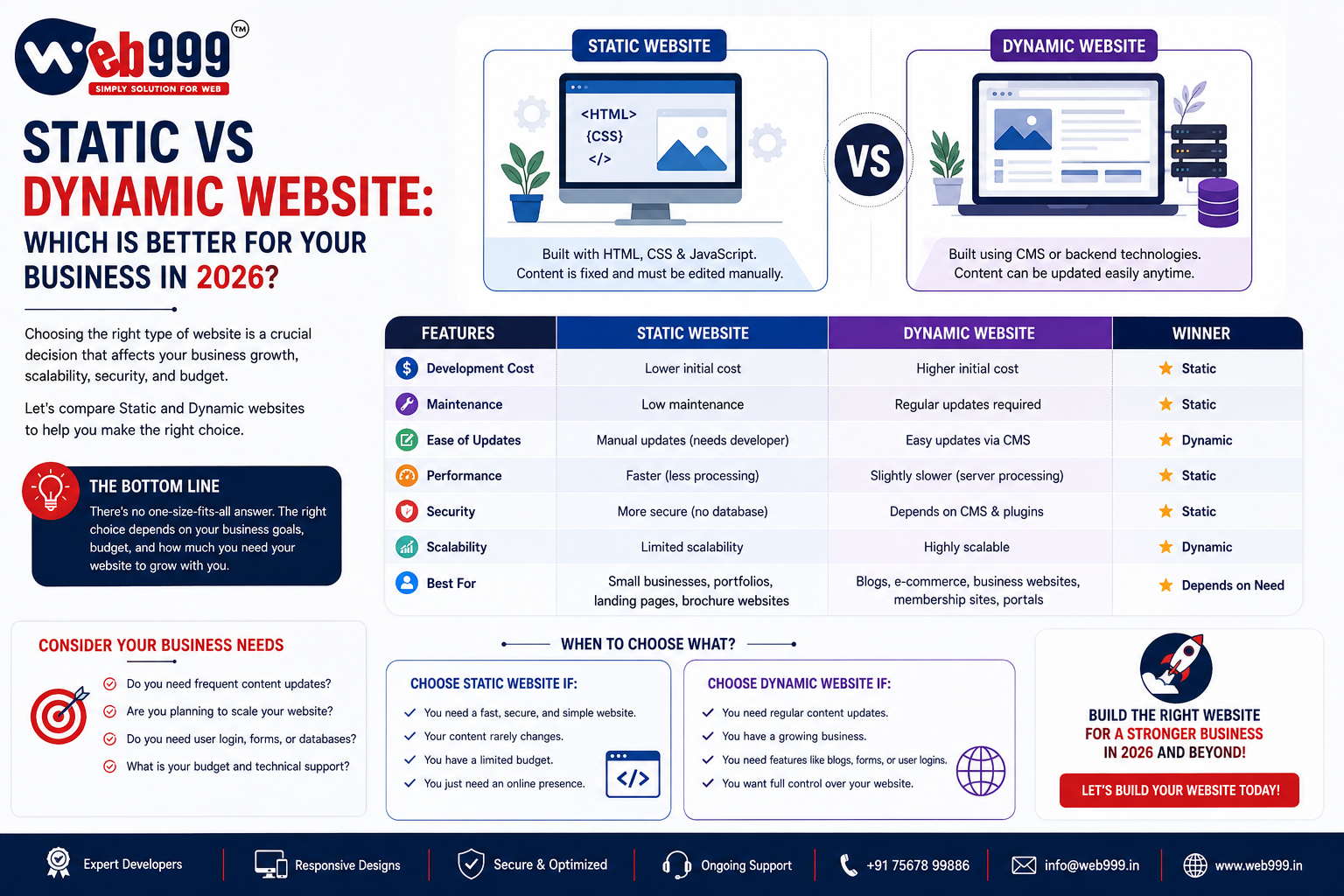
If you are planning a new business website in 2026, you may hear two common terms during the discussion:
Static website
and
Dynamic website
For a business owner, these terms can sound technical.
But the difference is actually quite simple.
A static website is usually built with fixed pages that do not change unless someone edits the website files.
A dynamic website can display and manage changing content through a backend or content management system such as WordPress.
Both types of websites can be useful.
The better option depends on what your business actually needs.
This guide explains the difference between static and dynamic websites, their advantages, disadvantages, cost, SEO potential and which option may be better for your business in 2026.
What Is a Static Website?
A static website is made of fixed web pages.
The content shown to visitors is usually stored directly inside the website files.
For example, a basic five-page business website may include:
- Home
- About Us
- Services
- Gallery
- Contact Us
If you want to change a phone number, service description or image, someone generally needs to edit the website files and upload the updated version.
Static websites are usually created using technologies such as:
- HTML
- CSS
- JavaScript
They can be simple, fast and lightweight.
For businesses that rarely need to update their website, this can be perfectly suitable.
What Is a Dynamic Website?
A dynamic website can manage and display content using a database or backend system.
Instead of manually editing website files every time you want to make a change, you can often log in to an admin panel.
For example, a WordPress website may allow you to:
- Add a new page
- Publish a blog
- Upload an image
- Change a service
- Add a product
- Update pricing
- Edit contact details
without directly editing the source code.
Dynamic websites are commonly used for:
- Business websites
- Blogs
- News portals
- E-commerce websites
- Membership websites
- Booking websites
- Real estate portals
- Product catalogues
They are generally better suited to websites that change regularly.
Static vs Dynamic Website: Quick Comparison
Content Changes
Static Website: Manual
Dynamic Website: Easier through admin panel
Development Complexity
Static Website: Lower
Dynamic Website: Higher
Website Speed
Static Website: Usually very fast
Dynamic Website: Can also be fast if optimized
Database
Static Website: Usually not required
Dynamic Website: Usually required
Blog Management
Static Website: Difficult
Dynamic Website: Easy
Product Management
Static Website: Limited
Dynamic Website: Easy
User Login
Static Website: Usually not suitable
Dynamic Website: Supported
E-Commerce
Static Website: Not practical for most stores
Dynamic Website: Suitable
Maintenance
Static Website: Low for simple sites
Dynamic Website: Regular updates may be required
SEO
Static Website: Good if properly built
Dynamic Website: Very good if properly managed
Scalability
Static Website: Limited
Dynamic Website: Better for growing websites
Cost
Static Website: Usually lower
Dynamic Website: Usually higher
The important thing to remember is that dynamic does not automatically mean better, and static does not automatically mean outdated.
The right choice depends on your business requirements.
How Does a Static Website Work?
Think of a static website like a printed company brochure available online.
The information remains the same until someone manually changes it.
Suppose your website says:
“We provide industrial fabrication services in Ahmedabad.”
That text remains exactly the same every time someone visits the website.
If you later want to add a new service, a developer may need to edit the page.
This is simple and efficient when your website does not require regular changes.
How Does a Dynamic Website Work?
A dynamic website can retrieve information from a database and generate pages based on the content stored in the system.
For example, an e-commerce store may have thousands of products.
Instead of creating each page manually in code, the website can generate product pages using information such as:
- Product name
- Price
- Description
- Images
- Stock
- Category
The same principle applies to blog websites.
When you publish a new WordPress article, you do not usually create a completely new HTML website from scratch.
You enter the content through the admin panel, and the website handles the page structure.
Advantages of a Static Website
Static websites still have several advantages.
1. Fast Loading
Static websites can be extremely fast because there is less processing involved.
The web server can deliver the page directly to the visitor.
This can make static websites a good choice for simple websites where speed is important.
2. Lower Development Cost
A basic static website generally requires less development work.
If your business only needs a few informational pages, it can be a cost-effective solution.
3. Simple Hosting
Static websites usually require fewer server resources.
That can make hosting simple and inexpensive.
4. Lower Maintenance Requirements
There is usually no complex database or large collection of plugins to maintain.
For a website that almost never changes, this can reduce technical maintenance.
5. Good Security Potential
A simple static website has fewer moving parts.
If there is no database, login area or complex backend, there may be fewer common attack points.
That does not mean static websites are automatically secure, but their simplicity can reduce certain risks.
Disadvantages of a Static Website
The simplicity of static websites can also create limitations.
1. Content Updates Can Be Difficult
If you want to update your website regularly, manual editing becomes inconvenient.
Imagine having to contact your developer every time you want to publish a new blog.
That is not practical for an active marketing website.
2. Difficult to Scale
A five-page static website is easy to manage.
A 500-page static website is a different story.
As the website grows, managing content manually can become inefficient.
3. Not Ideal for Blogs
A business planning to publish SEO blogs regularly will usually benefit more from a content management system.
4. Limited Interactive Features
Advanced functionality such as:
- User accounts
- Customer dashboards
- Shopping carts
- Online booking
- Personalized content
is usually better handled through a dynamic system.
Advantages of a Dynamic Website
Dynamic websites are popular because they offer flexibility.
1. Easier Content Management
This is one of the biggest advantages.
A business owner or marketing team can often update website content without writing code.
For example, you can publish a new article through WordPress.
This is particularly useful for businesses investing in SEO.
2. Better for Large Websites
Dynamic websites are easier to manage when you have many:
- Products
- Services
- Blog posts
- Categories
- Locations
- Team profiles
You can organize information through the backend instead of manually coding every page.
3. Suitable for E-Commerce
If you want customers to:
- Add products to cart
- Make payments
- Create accounts
- Track orders
you generally need a dynamic e-commerce system.
Platforms such as WooCommerce make this much easier.
4. Advanced Functionality
Dynamic websites can support features such as:
- Online booking
- Membership systems
- Customer login
- Dealer portals
- CRM integration
- Product filters
- Search functionality
- Custom dashboards
5. Better for Long-Term Growth
A dynamic website can usually grow with your business more easily.
You can add new services, products, locations and content without rebuilding the entire website.
Disadvantages of a Dynamic Website
Dynamic websites also have trade-offs.
1. Higher Initial Cost
Because the development is more complex, dynamic websites generally cost more than a basic static website.
2. More Maintenance
A dynamic website may require:
- Software updates
- Plugin updates
- Database maintenance
- Security monitoring
- Backups
This is especially important for WordPress and e-commerce websites.
3. Performance Needs Attention
A badly configured dynamic website can become slow.
For example, too many plugins, large images and poor hosting can affect performance.
However, a properly optimized dynamic website can still be very fast.
Static vs Dynamic Website for SEO
A common misconception is that dynamic websites automatically rank better on Google.
That is not true.
Both static and dynamic websites can rank.
Google cares much more about factors such as:
- Useful content
- Website speed
- Mobile usability
- Page structure
- Internal linking
- Technical SEO
- Backlinks
- Search intent
A well-built static website can perform very well in search.
The problem appears when a business needs to publish new content regularly.
For example, if you want to publish:
- SEO blogs
- New service pages
- Product pages
- Location pages
- Case studies
a dynamic CMS usually makes the process much easier.
For businesses investing seriously in SEO in 2026, that flexibility can be valuable.
Static vs Dynamic Website for Small Businesses
A small business does not automatically need a dynamic website.
Suppose you run a small local business and only need:
- Home page
- About page
- Three service pages
- Contact page
You do not plan to blog.
You do not sell products online.
Your services rarely change.
In this situation, a static website may be enough.
But suppose your business plans to:
- Publish regular blogs
- Add new services
- Target multiple locations
- Manage content internally
Then a dynamic website may be the better long-term choice.
Static vs Dynamic Website for Manufacturers
Manufacturing companies often need more than a simple five-page website.
A manufacturer may have:
- Product categories
- Individual product pages
- Technical specifications
- Downloadable catalogues
- Industry pages
- Blogs
- Case studies
If the product range changes or grows regularly, a dynamic website is usually more practical.
However, a small manufacturer with a limited product range and no frequent updates can still use a well-built static website.
The decision should depend on content volume and future plans.
Static vs Dynamic Website for E-Commerce
For most e-commerce businesses, a dynamic website is the practical choice.
An online store needs to manage changing information such as:
- Products
- Prices
- Stock
- Orders
- Customer accounts
- Payments
- Coupons
Managing all of this through a static website would be extremely difficult.
This is why platforms such as WooCommerce and Shopify rely on dynamic content management.
Static vs Dynamic Website for SEO Blogs
If you want to build a long-term content strategy, a dynamic website is usually easier to manage.
For example, imagine publishing 100 blogs.
With WordPress, your team can log in and publish each article through the admin panel.
You can create:
- Categories
- Tags
- Featured images
- Internal links
- Author pages
This makes content management more practical.
Static vs WordPress Website
WordPress is one of the most common examples of a dynamic website.
A Static Website Can Be Better When
- You need only a few pages
- Updates are rare
- Speed and simplicity are priorities
- You do not need a backend
WordPress Can Be Better When
- You want to publish blogs
- You regularly change content
- You have many pages
- You want to manage the website yourself
- You may add new features later
Neither option is automatically correct for every business.
Which Website Is Faster?
Static websites generally have an advantage because the pages can be delivered directly.
However, website speed depends on much more than whether the site is static or dynamic.
A badly optimized static website with extremely large images can still be slow.
A properly optimized WordPress website with:
- Good hosting
- Caching
- Image optimization
- Clean code
can be very fast.
The goal should be performance, not simply choosing a technology because someone says it is “fast.”
Which Website Is More Secure?
Static websites can have a smaller attack surface because they often do not include:
- Admin dashboards
- Databases
- Plugins
- User accounts
Dynamic websites require more security management.
For example, a WordPress website should be kept updated.
Dynamic Website Security Practices
- Strong passwords
- SSL
- Regular updates
- Backups
- Secure hosting
- Limited admin access
Both types of websites still require responsible configuration.
Which Website Costs More?
A static website is usually cheaper to build.
A dynamic website generally costs more because it requires:
- Backend setup
- Database
- CMS configuration
- Additional development
- Testing
However, initial price is not the only consideration.
Suppose you save money by choosing a static website.
Six months later, your business starts publishing regular content and adding services.
You may then have to pay a developer repeatedly to make changes.
In that situation, the cheaper option may become more expensive over time.
Think about your expected requirements for the next few years.
Maintenance Cost: Static vs Dynamic
Static website maintenance is usually lower if nothing changes.
A dynamic website can require ongoing maintenance because the CMS, themes or plugins may need updates.
But a dynamic website also gives you more control.
Your team may be able to handle many content updates internally.
So maintenance cost should be viewed together with flexibility.
Can a Static Website Be Converted to Dynamic Later?
Yes, but it may require redevelopment.
For example, an existing static company website can be rebuilt using WordPress.
The design can sometimes be retained while adding:
- Admin panel
- Blog
- Product management
- Dynamic pages
If you already know that your website will grow rapidly, it may make more sense to choose a scalable system from the start.
Can a Dynamic Website Be Faster Than a Static Website?
In some situations, yes.
Modern caching, content delivery networks and optimized hosting can make dynamic websites extremely fast.
However, static architecture is naturally simple and can offer excellent performance.
For most business owners, the better question is not:
“Which technology is theoretically faster?”
It is:
“Will my actual website be properly optimized?”
Static Website Example
Imagine a small architecture consultant in Ahmedabad.
They need:
- Homepage
- About Us
- Services
- Projects
- Contact
The content changes only once or twice per year.
There are no blogs, bookings or customer accounts.
A static website can work perfectly well.
Dynamic Website Example
Now imagine a digital marketing company.
It regularly publishes:
- Blogs
- Case studies
- New services
- Landing pages
The team wants to manage content internally.
A dynamic website such as WordPress makes much more sense.
Another Dynamic Website Example: Online Store
Imagine a fashion brand selling 500 products.
Prices and stock change frequently.
Customers need to:
- Browse products
- Filter products
- Add to cart
- Pay online
- View orders
This definitely requires a more dynamic e-commerce setup.
What Should You Choose in 2026?
Choose a Static Website If
- Your website is small
- Content rarely changes
- You do not need blogs
- You do not need e-commerce
- You do not need user accounts
- Your budget is limited
- You prefer a simple setup
Choose a Dynamic Website If
- You regularly update content
- You want to publish blogs
- You have many products or services
- You need an e-commerce store
- You need an admin panel
- You want advanced functionality
- You expect the website to grow
This is a practical way to make the decision.
Questions to Ask Before Choosing
Before telling your web developer which type of website you want, answer these questions:
Content Updates
How Often Will I Update My Website?
Consider Whether Updates Will Be Rare or Frequent
Blogging
Do I Want to Publish Blogs?
Regular Blogging Usually Favors a Dynamic CMS
Products and Services
Will I Add New Products or Services?
Growing Content Needs More Flexible Management
Payments
Do I Need Online Payments?
E-Commerce Usually Requires Dynamic Functionality
Customer Accounts
Do Customers Need Accounts?
Login Systems Are Better Suited to Dynamic Websites
Internal Management
Will My Internal Team Update Content?
An Admin Panel Can Make This Much Easier
Future Growth
Will the Website Grow Significantly Over the Next Two or Three Years?
Think About Long-Term Requirements Before Choosing
Your answers will usually make the right choice clear.
Common Mistakes Businesses Make
Choosing Dynamic Just Because It Sounds Advanced
More technology does not automatically mean a better website.
Do not pay for functionality you will never use.
Choosing Static Only Because It Is Cheaper
If you know your business needs regular updates, this can create problems later.
Ignoring SEO
Whichever platform you choose, make sure the website has a proper SEO foundation.
Ignoring Mobile Users
Both static and dynamic websites must be responsive.
Using Too Many Plugins
A dynamic website does not need a plugin for every tiny feature.
Poor plugin management can affect speed, stability and security.
Not Planning for Future Growth
Think beyond your current five pages.
Where will your business be in two or three years?
Static vs Dynamic Website: Which Is Better for Ahmedabad Businesses?
For many small Ahmedabad businesses with a simple online presence, a static website can still be a good option.
For businesses that depend on:
- SEO
- Regular content
- Product updates
- Lead-generation pages
- E-commerce
- Multiple locations
a dynamic website is generally more flexible.
The best website is not the one with the most complicated technology.
It is the one that matches your business requirements.
How Web999 Can Help
At Web999, we provide website design and development solutions based on actual business requirements.
Instead of recommending the same type of website to every company, the right approach is to first understand:
- Business type
- Number of pages
- Products or services
- Update frequency
- Marketing goals
- SEO requirements
- Required functionality
- Budget
Depending on the project, a business may need:
- Static website development
- WordPress website development
- Business website development
- E-commerce website development
- Website redesign
- Custom functionality
The objective should always be to build a website that is practical for your business.
Frequently Asked Questions
What Is the Main Difference Between Static and Dynamic Websites?
A static website normally displays fixed content from website files.
A dynamic website can manage changing content through a database and backend system.
Which Is Cheaper, Static or Dynamic Website Development?
Static websites are usually cheaper for simple projects.
Dynamic websites normally cost more because they require more functionality and development.
Is WordPress Static or Dynamic?
WordPress is a dynamic content management system.
Which Website Is Better for SEO?
Both can rank well when properly developed and optimized.
Dynamic websites can be more convenient for businesses that publish new SEO content regularly.
Which Is Better for a Small Business?
A small business with only a few fixed pages may be fine with a static website.
A business planning frequent updates, blogs or future expansion may benefit from a dynamic website.
Which Type of Website Is Best for E-Commerce?
Most e-commerce websites need dynamic functionality to manage products, inventory, orders and customer information.
Can I Update a Static Website Myself?
It is possible if you understand the website code or if a custom editing system has been created.
Otherwise, updates usually require a developer.
Can I Update a Dynamic Website Myself?
In many cases, yes.
Content management systems such as WordPress allow authorized users to manage website content from an admin panel.
Final Verdict: Static or Dynamic?
There is no universal winner.
A static website is often the better choice when you need simplicity, speed and a small number of fixed pages.
A dynamic website is usually better when you need flexibility, regular updates and room for growth.
For most growing businesses in 2026, especially those planning SEO, blogging, product management or e-commerce, a dynamic website can offer more long-term flexibility.
But if your requirements are simple, there is no reason to overcomplicate the project.
Choose the website your business actually needs, not the one that sounds more advanced.
If you are unsure which option is suitable for your business, Web999 can help you compare static and dynamic website development based on your content, features, budget and future plans.
